
What Is a VPN? A Simple Explanation

A VPN (Virtual Private Network) is a service that routes your internet connection through a remote server and encrypts the connection between your device and that server. This can make it harder for some parties on the same network to view your traffic in transit, and it can change the public IP address websites see.
VPNs are commonly used to add a privacy layer on public Wi-Fi, reduce exposure of a home IP address during everyday browsing, and help keep connections more consistent while traveling. What a VPN achieves in practice can vary by provider, device, and network conditions.
What a VPN changes (in simple terms)
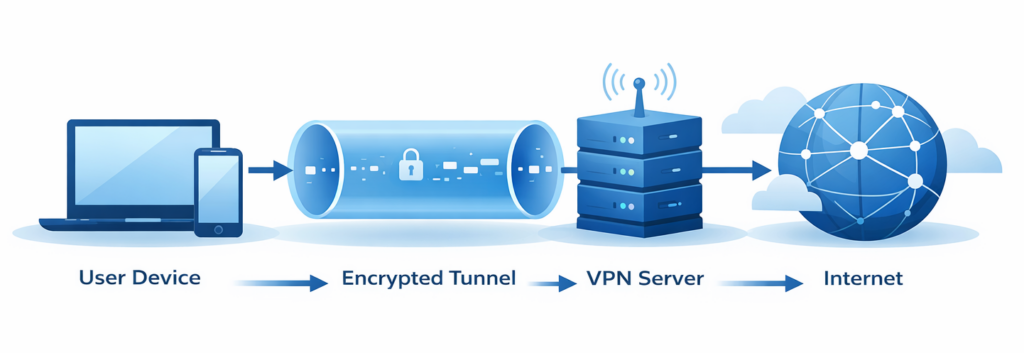
- Your connection path: traffic typically goes from your device to a VPN server first, then to the internet.
- Visibility on local networks: encryption may reduce what others on the same Wi-Fi network can observe.
- Your public IP address: many sites will see the VPN server’s IP address rather than your usual one.
What a VPN is not
- Not a guarantee of anonymity: logins, cookies, and browser fingerprinting can still identify you.
- Not antivirus software: a VPN does not prevent malware by itself.
- Not a promise of access: streaming and website access can change and may be inconsistent.
❗ Important note
A VPN can encrypt traffic between your device and the VPN server, but it does not automatically make all online activity private.
How Does a VPN Work?
A VPN works by creating an encrypted connection between your device and a remote server operated by the VPN provider. This connection is often described as a “secure tunnel,” although the exact technical implementation can differ depending on the VPN software, protocol, and device you use.
Once the VPN connection is active, your internet traffic is first sent to the VPN server. From there, it continues to the websites or online services you access. As a result, those services typically see the VPN server’s IP address instead of your usual public IP address.
The basic process, step by step
- You connect to a VPN server. This is usually done through a VPN app or built-in system settings, depending on the device and provider.
- Your connection is encrypted. Data traveling between your device and the VPN server is encrypted, which may reduce the risk of interception on certain networks.
- Your traffic is routed through the VPN server. Requests to websites and services are forwarded from the VPN server to the internet.
- Websites respond through the same path. Responses travel back through the VPN server and are decrypted on your device.
The level of security, speed, and reliability you experience can vary based on factors such as server location, network congestion, and the VPN protocol in use. Not all VPN connections behave the same way in every situation.
💡 Quick tip
Connecting to a VPN server that is geographically closer to you often helps reduce latency, but performance can still vary depending on server load and local network conditions.
What Changes When You Turn On a VPN?
When you connect to a VPN, the most noticeable changes happen at the network level rather than on the websites or apps themselves. While the experience is usually seamless, a few technical aspects of your connection are handled differently once the VPN is active.
What websites and services may see
From the perspective of most websites, your connection typically appears to come from the VPN server instead of your actual physical location. This can affect how location-based content is displayed, although results may vary depending on the service and how it determines user location.
What you may notice on your device
- A new IP address: your public IP usually changes to match the VPN server you’re connected to.
- An active VPN indicator: most devices display a small icon or status message while the VPN is enabled.
- Slight performance changes: speeds or latency may increase or decrease depending on server distance and network conditions.
Even with a VPN enabled, activity linked to logged-in accounts, browser settings, or stored cookies can still influence how services recognize you online.
❗ Important note
Using a VPN does not hide activity within accounts you are signed in to, and it does not remove existing cookies or browser identifiers. Those elements can still affect how websites recognize returning users.
What to Look for in a VPN
Not all VPN services offer the same features or level of transparency. When comparing providers, it can help to focus on a few core areas that directly influence usability, privacy, and long-term reliability.
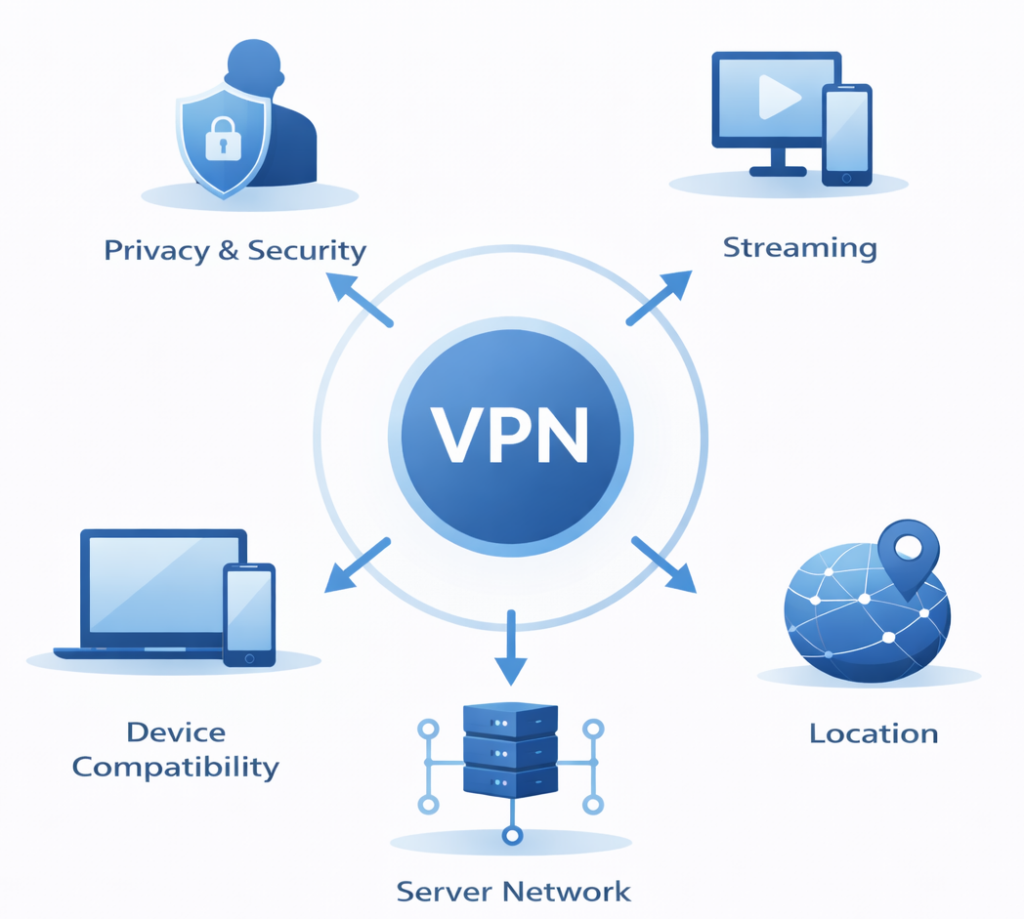
- Privacy & Security Look for clear information about encryption standards, supported protocols, and stated logging practices. Transparency around how user data is handled is usually more important than marketing claims.
- Server Network Check how many servers and countries are available, as well as how evenly they are distributed. A wider network can offer more flexibility, but performance may still vary by server and region.
- Location Options Pay attention to which countries you can connect to and whether locations relevant to you are included. Availability can differ between providers and may change over time.
- Streaming Compatibility See whether the VPN is reported to work with the streaming services you use. Access is not guaranteed, so it’s worth checking recent information and understanding that results may vary.
- Device Compatibility Make sure the VPN supports all the devices and operating systems you plan to use. Also check whether features are consistent across apps or limited on certain platforms.
Does a VPN Slow Down Your Internet?
Using a VPN can affect internet performance because your traffic takes an additional step before reaching its destination. Instead of connecting directly to a website, data is routed through a VPN server first, which can add latency in some situations.
How noticeable this impact is depends on several factors, and results can vary significantly between users, locations, and providers.
Factors that commonly influence VPN speed
- Server distance: connecting to a nearby server often reduces latency compared to distant locations.
- Server load: heavily used servers may perform worse during peak times.
- Network conditions: your base internet speed and local congestion still play a role.
- Protocol choice: different VPN protocols can behave differently depending on the setup.
Is It Legal to Use a VPN?
In many countries, using a VPN is legal and widely accepted for privacy and security purposes. VPNs are commonly used by individuals and organizations to protect connections on shared or untrusted networks.
However, laws and regulations can differ by country, and they may change over time. Some regions place restrictions on VPN usage or require services to meet specific regulatory conditions.
Even where VPNs are legal, using one does not make illegal activities lawful. Users are still responsible for complying with local laws and the terms of service of the websites and platforms they access.
❗ Regional differences
If you are traveling or living in a country with internet restrictions, it’s worth checking the current local rules around VPN usage, as enforcement and regulations can vary.
Who Might Benefit From Using a VPN?
A VPN can be useful in certain situations, but it is not a mandatory tool for every internet user. Whether it adds value depends on how and where you connect, and what you want to protect.
VPNs may be useful for
- Public Wi-Fi users : adding a layer of encryption on shared networks such as airports or cafés.
- Frequent travelers : maintaining a more consistent connection experience across different networks.
- Privacy-conscious users: reducing exposure of a home IP address during everyday browsing.
- Remote workers: adding protection on home or mobile connections, separate from corporate VPNs.
For users who primarily browse at home on trusted networks and already follow good security practices, a VPN may offer more limited benefits.
Frequently Asked Questions About VPNs
-
Does a VPN make you anonymous online?
A VPN does not make users fully anonymous. While it can hide a public IP address from many websites, other identifiers such as logged-in accounts, cookies, browser fingerprinting, or device settings may still allow activity to be linked to an individual.
-
Can a VPN protect you on public Wi-Fi?
A VPN can encrypt traffic between a device and the VPN server, which may reduce certain risks when using shared or unsecured Wi-Fi networks. However, it does not eliminate all risks and should not replace basic device security or safe browsing practices.
-
Will a VPN slow down your internet connection?
Using a VPN can affect internet speed because traffic is routed through an additional server. The impact varies depending on factors such as server distance, network congestion, and the protocol in use. In some cases, the difference may be minor, while in others it can be more noticeable.
-
Are VPNs legal to use?
In many countries, using a VPN is legal and common for privacy or security purposes. However, laws and regulations vary by region and can change over time. Even where VPNs are legal, using them for illegal activities remains unlawful.
-
Do VPNs work on phones and tablets?
Most VPN providers offer apps for mobile devices such as Android and iOS. Feature availability and performance may differ from desktop versions, and some options may be not specified on certain platforms.
-
Are free VPNs safe to use?
Some free VPNs are available, but they often come with limitations such as data caps, fewer servers, or slower speeds. Privacy practices vary widely, so reviewing what data is collected or retained is important before relying on a free service.
Next Steps
If you’re considering using a VPN, the next step is usually to compare services based on clear criteria such as privacy policies, device support, and reported performance. Needs can differ depending on whether your priority is public Wi-Fi use, travel, or general privacy.
You may also find it useful to explore detailed reviews and comparison guides to better understand the differences between providers and the trade-offs involved.